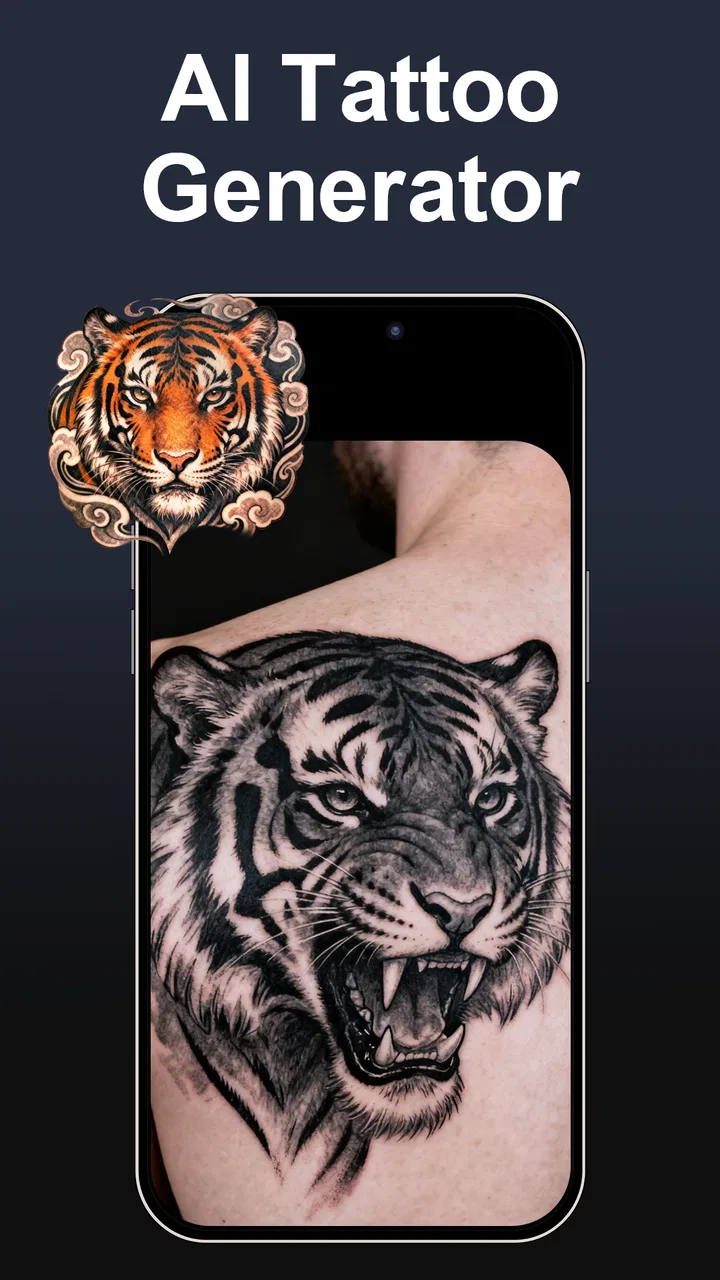
AI Tattoo Design
- 4.5
- Rating
- 100.00K
- Installs
- Free
- Price
 Analysis by App-foxy
I approached AI Tattoo Design as a practical idea tool rather than a replacement for a professional tattoo artist. Its purpose is simple: help you explore tattoo concepts on a phone, save designs you like, and narrow down a direction before committing to something permanent. That sounds modest, but it solves a real problem. Many people know the mood, subject, or placement they want, yet struggle to turn that feeling into a useful visual reference.
In my experience, the app is most valuable during that uncertain first stage. You can use it when you are collecting ideas for a sleeve, testing a small symbol, or trying to decide whether a particular style suits you. It belongs to the Art & Design category, is free to install, and is suitable for Everyone. The developer is CamSoft AI Magic, and the app has built enough interest to reach over one hundred thousand installs with an average rating of 4.2 from around seven thousand five hundred ratings.
That audience size does not make every generated image good, of course. The useful question is whether the app helps you make a better decision than scrolling through random tattoo pictures or asking an artist to interpret a vague idea from scratch. For me, the answer is yes, provided you treat the results as sketches for discussion rather than finished tattoo artwork.
You May Also Like

 Blood Strike: 2.5 Anniversary
Blood Strike’s Loadouts Turn Every Drop Into a Tactical Gamble
A close look at Blood Strike’s custom loadouts: how fast access to signature weapons reshapes its battle royale rhythm, rewards preparation, and narrows the gap between fights.

 Pandora - Music & Podcasts
Pandora’s Music Is Easy to Start, but Harder to Recover
Pandora’s strength is its low-effort path from a seed to a station. Its weak spot is how much confidence it asks you to place in connection, setup, and quiet recovery.

 8 Ball Pool
 Is Built on Rivalries, Rematches, and Routine
A close look at the rivalries, rematches, shared routines, and unanswered safety questions that turn a quick pool match into a persistent mobile community.

 Samsung Music
’s Quiet Strength Is Playing What You Already Own
Its reach comes less from spectacle than from dependable access to a personal library. That simplicity is both the app’s strongest retention engine and its ceiling.

 AccuWeather: Weather Radar
AccuWeather Review: A Quick, Clear Forecast for Everyday Decisions
For everyday plans, the best forecast is the one you can understand quickly. AccuWeather makes rain timing, radar, and local conditions easy to act on, with a few trade-offs.

 Hill Climb Racing
Why Hill Climb Racing Still Turns Crashes Into One More Run
A tiny car, a bumpy hill and one more upgrade: Hill Climb Racing keeps resurfacing because its simple chaos makes every near-miss feel personal.
More From Our News Desk



How I Would Decide Whether It Fits
The first decision is about your goal. If you want an instant visual starting point, this app makes sense. If you already have a precise design prepared by an artist, it adds less value. It is also not the right tool for judging whether a design will age well on skin, how it will follow a particular body contour, or whether fine details can be tattooed safely. Those decisions still belong with an experienced professional.
I would also separate inspiration from production. A generated image can show a general composition, subject, atmosphere, or combination of motifs. It may not preserve clean line weight, stencil-ready spacing, or the small structural details that matter in a real tattoo. That distinction is important because an attractive screen image can become confusing when reduced to a tattoo stencil.
The app is free to begin using, while optional in-app purchases range from forty-nine cents to twenty-nine dollars and ninety-nine cents per item. I would not pay immediately. I would first test whether the visual direction it produces is actually helping me. If the free experience gives you several promising starting points, a purchase may be easier to justify. If the results feel repetitive or too generic, spending more will not automatically solve the creative problem.
Another sensible criterion is patience. AI-generated tattoo concepts often need interpretation. A strong result may be useful because it combines elements you had not considered, while a weak result can still reveal what you dislike. I found the app more productive when I judged each image as a design conversation: keep the subject, remove the clutter, change the placement, simplify the shading, and show the useful parts to a tattooer.
Turning a vague idea into a workable brief
A practical workflow is to begin with one central idea instead of asking for everything at once. For example, someone planning a forearm piece might start with a moth, a crescent moon, and a preference for fine black linework. After reviewing the first concepts, they can identify whether the composition feels too decorative, too dark, or too crowded. The next round of thinking should focus on one correction at a time.
This is one of the app’s less obvious strengths: it can help you discover the vocabulary needed to speak with an artist. You may begin by saying that you want “something mysterious,” then realize that you prefer symmetrical composition, negative space, restrained shading, or an illustrative look. Even when the generated result is not suitable for tattooing, it can make your personal brief much clearer.
I recommend saving only the concepts that contribute something distinct. Keeping every image creates a noisy folder and makes it harder to notice a consistent direction. A smaller reference set is more useful when you eventually discuss the project with a tattoo artist. Include the parts you like and write down what you would change, rather than presenting the entire collection as if it were ready to copy.
Where the app is especially useful
The strongest use case is early exploration. Suppose I am considering a small tattoo connected to travel, family, music, or a personal memory. I may have several symbols in mind but no idea how they could share one composition. An AI tool can place those ideas beside one another quickly, giving me something concrete to react to. That is faster than waiting for inspiration to arrive naturally and more focused than browsing unrelated images.
It is also helpful for comparing moods. The same subject can feel delicate, gothic, playful, geometric, traditional, or minimal depending on its treatment. Seeing those directions side by side helps me decide what actually feels personal. This is more useful than choosing a design simply because it looks impressive in isolation.
Another worthwhile workflow is using the app before a consultation. I would generate a few broad concepts, select the strongest visual ingredients, and then ask the artist to redraw or reinterpret them. That approach respects the artist’s role while making the appointment more productive. It also reduces the chance that I arrive with only an abstract sentence such as “I want something meaningful but not too obvious.”
For people who change their minds often, the app can function as a low-pressure test space. You can compare a bold image with a quieter version before making a permanent decision. It cannot simulate the full experience of wearing ink on your own body, but it can expose uncertainty earlier, when changing direction is still easy.
What separates a useful result from a pretty result
I pay attention to three things when judging a generated tattoo concept. First is silhouette: can I understand the main shape at a glance? Second is hierarchy: is there a clear focal point, or are all details competing for attention? Third is restraint: would the idea still work if some decoration and tiny texture were removed?
These checks are more valuable than simply asking whether an image looks polished. AI art can hide design weaknesses under dramatic lighting, intricate texture, or ornamental clutter. A tattoo needs to communicate through shape and spacing as well as detail. If I cannot explain the design in a few plain sentences, I probably need to simplify it before showing it to an artist.
A useful trick is to imagine the concept in several sizes. A small wrist or ankle tattoo needs a different level of detail from a large back piece. I would not assume that an image that looks excellent on a phone will remain legible when reduced. I would ask the artist to assess scale, line density, and long-term readability rather than relying on the app’s visual presentation.
Placement is another area where caution matters. The app can help you explore the relationship between motifs, but it should not be treated as a body-mapping tool. Curved areas, joints, and moving skin change the appearance of a design. A professional can adapt the composition to your anatomy in ways a general concept generator cannot.
Where it wins against familiar alternatives
Compared with ordinary image browsing, the app gives me a more active role. Searching through galleries is useful for learning styles and finding artists, but it can also encourage copying or leave me overwhelmed by unrelated results. Generating a concept from my own starting point keeps the exploration closer to the tattoo I am trying to define.
Compared with drawing from a blank canvas, it lowers the first barrier. I do not need strong illustration skills to begin comparing compositions. That makes it approachable for someone who can describe an idea but cannot sketch it. I still need judgment afterward, but I am not forced to solve the entire visual problem alone.
Compared with asking a tattoo artist for several unrelated sketches before booking, the app can be a considerate preparation step. Artists bring professional knowledge that AI cannot replace, and their time is valuable. Arriving with a focused direction is better than asking them to guess through many vague possibilities.
The app also has an advantage over general-purpose AI art tools when the subject is specifically a tattoo. The intended context encourages me to think about tattoo references rather than merely attractive standalone illustrations. That does not guarantee a technically tattooable result, but it keeps the exploration closer to the decision I actually need to make.
Where another option may fit better
If your priority is finding a trustworthy artist, a tattoo portfolio platform or local studio directory is more useful. Those alternatives help you evaluate healed work, specialization, consistency, and communication. AI Tattoo Design can help you form an idea, but it cannot tell you whether an artist’s technique matches that idea.
If you need a production-ready stencil, professional design software or direct collaboration with a tattooer is the better route. Clean vectors, controlled linework, deliberate negative space, and body-specific adjustments require more than a generated picture. I would be especially cautious with portraits, lettering, tiny symbols, and designs containing exact text, because small inaccuracies can become permanent mistakes.
If you already draw confidently, a conventional illustration app may offer more control. A blank canvas is slower at the beginning, but it gives you deliberate ownership of every line. The AI approach trades control for speed, so the right choice depends on whether you are trying to discover a direction or execute one you already understand.
There is also a personal-fit question. Some people want their tattoo to emerge entirely from their own hand or from a close collaboration with an artist. For them, generated concepts may feel impersonal. I would skip this app if the creative process itself is central to the meaning of the tattoo, or if browsing AI variations would make you less confident rather than more confident.
A realistic everyday scenario
Imagine that I am preparing for a consultation next month and want a nature-inspired piece, but I am torn between a clean emblem and a more organic illustration. I would use the app to explore both directions, save a small selection, and mark the differences I notice: one version may have a stronger silhouette, another may use negative space better, and a third may combine the subject with a secondary symbol in a more personal way.
Before the appointment, I would remove details that exist only because they look impressive on screen. I would then bring the remaining references to the artist with a short explanation of what I want preserved and what I want changed. The artist could use that material as a starting point rather than as a demand to reproduce an AI image exactly. This workflow turns the app into a communication aid, which is where I think it is most responsible and effective.
Managing purchases and the cost of changing direction
The main cost is not only money. It is also the possibility of becoming attached to a concept that was never designed for your body or for long-term tattoo readability. I would avoid treating a generated image as a final answer simply because it appears polished. The cheaper decision is often to spend more time comparing ideas before commissioning custom work or booking an appointment.
Because the app is free, the sensible switching strategy is low risk: try it, save useful discoveries, and move to another method when it stops adding clarity. You do not need to rebuild your entire creative process around it. If you later prefer a sketching app, artist consultation, or reference gallery, the concepts you developed can still help explain your direction.
Optional purchases deserve the same restraint. I would consider paying only when the app is producing genuinely different directions or when it is helping me overcome a specific creative block. I would not buy simply to chase a perfect image. Tattoo quality depends on interpretation, placement, technique, and collaboration after the concept stage, so additional generated variations have diminishing value if the underlying brief remains vague.
Practical limits I would keep in mind
The app’s current version is 1.2.0529 and it supports devices running Android 8.0 or later. That makes it accessible to many Android users, but I would still expect the experience to vary with the phone and with the complexity of the visual request. Large or detailed concepts are more demanding to judge on a small screen, and a design that looks clear when zoomed in may not work at normal viewing size.
The Everyone age rating makes it approachable for general audiences, but younger users should still understand the permanence of tattoo decisions. The app can make experimentation feel casual, while the real-world result is not casual. I would treat it as an idea board and involve a responsible adult and a qualified professional where appropriate.
I would also keep personal information out of the creative process unless it is genuinely necessary. A tattoo idea may reveal something private about your identity, relationships, beliefs, or health. The safest habit is to describe the visual concept without adding sensitive background details. That keeps the session focused and makes the references easier to share selectively.
My recommendation for different kinds of users
I recommend it to first-time tattoo planners, people who have a theme but no visual language, and anyone comparing several styles before speaking with an artist. It is particularly useful if you are stuck between two very different moods and need to see the contrast rather than think about it abstractly.
I recommend it with reservations to experienced tattoo collectors. It can still provide unexpected combinations, but you may get more value from a trusted artist, a specialist portfolio, or your own sketching workflow. The more specific your requirements become, the more important professional control is likely to be.
I would skip it if you expect a finished stencil, exact lettering, anatomically precise placement, or a faithful portrait. I would also skip it if you are looking for a substitute for researching artists. Those needs are better served by tools and people built around technical execution, not rapid visual exploration.
My Final Take
AI Tattoo Design is a useful starting point for turning an uncertain tattoo idea into something you can discuss. Its best contribution is not that it produces a perfect design instantly; it is that it helps me compare directions, identify preferences, and arrive at an artist consultation with a clearer brief. That makes it more valuable as a decision aid than as a final design service.
The free entry point makes experimentation easy, while the optional purchases mean I would test the workflow before spending. The 4.2 average and growing install base suggest that many users find the concept worthwhile, but those figures should not replace personal testing. The app is free, rated for Everyone, and developed by CamSoft AI Magic, so it is straightforward to try if you are curious.
My clear recommendation is to use it in stages: generate broadly, save selectively, simplify aggressively, and let a professional adapt the result to your body and skin. If you follow that process, the app can save time and make your ideas easier to communicate. If you want technical tattoo artwork ready to apply, choose an artist or a controlled design tool instead. For early inspiration, though, it earns a place on my shortlist.
FAQs for AI Tattoo Design
01What is AI Tattoo Design, and how does it work?
AI Tattoo Design is a mobile application that uses artificial intelligence to generate unique tattoo designs based on your preferences. By entering specific themes, styles, or personal elements, the app creates custom designs. It leverages advanced algorithms to ensure that each design is tailored to your taste and can be previewed on your skin using augmented reality.
02Is AI Tattoo Design free to use, or are there any in-app purchases?
The app is free to download with basic features available to all users. However, there are in-app purchases that provide access to premium designs, advanced customization options, and ad-free experiences. These purchases enhance the usability and creative potential of the app, allowing users to explore more intricate tattoo designs.
03How accurate is the augmented reality feature for previewing tattoos?
The augmented reality feature in AI Tattoo Design is highly accurate, offering a realistic preview of how the tattoo will look on your skin. It uses your device's camera to overlay the design onto your body in real-time. While it provides a close approximation, it's advisable to consult with a professional tattoo artist for final adjustments.
04Can I save and share the designs created in AI Tattoo Design?
Yes, the app allows you to save your favorite designs in a personal gallery. You can also share these designs with friends or tattoo artists through social media or messaging platforms. This feature is particularly useful for getting feedback or collaborating with artists to refine your tattoo ideas.
05Is AI Tattoo Design suitable for professional tattoo artists?
While AI Tattoo Design is primarily aimed at individuals seeking personal tattoo ideas, professional tattoo artists can also benefit from it. The app serves as a creative tool to explore new styles and concepts, providing inspiration and a starting point for custom designs. Artists can use the generated designs as a foundation to create more personalized artwork for their clients.
Pros
- User-friendly interface for easy navigation.
- Wide range of tattoo styles available.
- Customizable design options for personalization.
- High-quality
- realistic design previews.
- Frequent updates with new design trends.
Cons
- Limited free features; in-app purchases needed.
- Some designs require a stable internet connection.
- Occasional lag on older devices.
- Ads can be intrusive during use.
- No direct export to tattoo studios.

AI Tattoo Design
Gallery